
Click Here to Start a New Power BI Journey
Trainings      UDFs in Power BI
BY HOW TO POWER BI   |    800k+ SUBSCRIBERS

User-Defined Functions
in Power BI

The Next Level of DAX

Stop writing the same DAX logic over and over.
Build a complete library of reusable DAX functions while developing a full report from scratch.
THE DIFFERENCE

Now imagine...

Write it once. Use it everywhere.

Writing DAX logic once, naming it, and calling it across every measure that needs it.
No more copy-paste. No more maintenance tax. 

Fix it in 30 seconds instead of 30 hours.

A business rule changes, calculation needs an update.
You fix it in one place. Every measure that calls it updates automatically. 

Everyone on the team uses the exact same logic.

No more five slightly different versions of the same calculation. One function, one definition. Full clarity and control.

You build faster. 

New report, new client, new model. You're calling the same functions, instead of reinventing them each time.

WHAT DEVELOPERS SAY ABOUT UDFS

 @eudaemon-y8j

YouTube 

"Have more than a few measures that could be replaced and simplified with a UDF."

@buthomoyo3541

YouTube 

"A true game changer."


@JesúsChaves-w4l

YouTube 

"Amazing new feature and easy to implement."


WHAT YOU WILL BUILD

Every visual in this report 

is powered by UDFs
you build in the course.
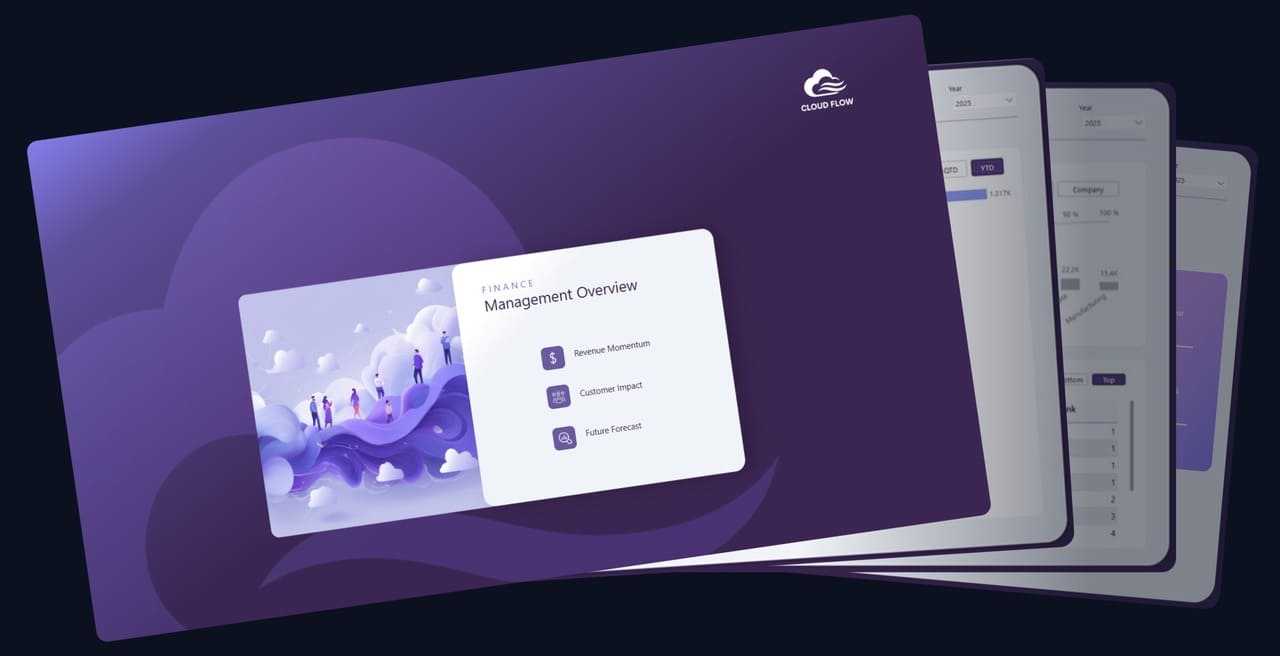
The CloudFlow Analytics report is your hand-on canvas.
A real, production-quality Finance Dashboard built entirely with UDFs you write from scratch.
End result? A complete library of reusable DAX functions -
time intelligence, forecasting, Pareto, ranking, SVG visuals and a full report.
RIGHT FIT?

Who This Is For

This course is built for Power BI developers who already know DAX and want to write it at a higher level: cleaner, faster, and built to scale.
  You're comfortable writing DAX but feel like you're solving the same problems over and over in every new project.
  You've heard about UDFs but haven't had a structured way to learn them properly, or aren't sure how far they can go.
  You work on teams where consistency matters and you're tired of logic drifting across models and developers.
  You want to leave behind models that are maintainable, shareable, and don't depend entirely on you to run.
  You're serious about operating at a senior level and you know that means thinking in systems, not just measures.
Empty space, drag to resize
THIS IS PROBABLY NOT FOR YOU IF

- You're new to DAX. Get confident with the fundamentals first before coming back to this.

- You're looking for a broad Power BI survey course. This one goes deep on one specific capability.

- You work solo on one-off reports with no reuse requirements. The payoff here is in scale.

Full Course Curriculum

   4 Modules 

  ~ 4 hours

  16+ lessons
Coming soon, included with enrollment
Write your awesome label here.
YOUR INSTRUCTOR

Bas Dohmen

I've spent a decade building Power BI solutions for enterprise clients worldwide, and sharing everything I learn with a community of 1M+ developers across YouTube, LinkedIn, Instagram, and TikTok. UDFs are a fundamental shift in how DAX works.
This course gives you my best practices and the mistakes to avoid, things that take a lot of trial and error to figure out on your own. My goal is to make it click for you, the same way it has for many of the Power BI developers I've worked with.
PRICING 

Access

Launch discount. Price goes up to 149 USD on April 22nd.

LAUNCH  WEEK  DISCOUNT

Full Course

$ 129  $149

+ tax


      All 4 modules (incl. Module 04 when live)  
 
      Reusable UDF library (TMDL)  
 
      CloudFlow Analytics Report 

      2 years access + all updates (during that time) 

      Certificate of completion


Frequently asked questions

Do I need to be an advanced DAX user?

No, but you should be comfortable writing basic measures. If you know CALCULATE, FILTER, and SUMX, you're ready. UDFs are the logical next step - and once it clicks, the way you build models changes permanently.

What version of Power BI Desktop do I need?

DAX User-Defined Functions require the September 2025 release or later. If you're on a current version, you're good.

Is this fully self-paced?

Yes, watch it whenever, as many times as you want. There are no cohorts, no live sessions.

How long do I have access?

You get 2 years of access from the date of purchase. That matters here because UDFs are still evolving - as Microsoft ships updates, so do we. You're not just buying what exists today.

What will I actually be able to do differently after this course?

You'll stop rebuilding the same logic from scratch on every project. Instead you'll have a personal UDF library you can drop into any model and a repeatable system for writing clean, reusable DAX. Your reports get faster to build, easier to maintain, and a lot easier to hand off.

Can't I just learn this from YouTube for free?

You'll find bits and pieces out there, including on my own channel. But free content teaches you tricks. This course gives you a system and a 360° view. There's a difference between watching someone build a UDF and walking away with a complete library, best practices, and the mistakes to avoid. Those take months of trial and error to accumulate on your own.

How is this different from a regular DAX course?

Most DAX courses teach you measures. This course teaches you to build reusable logic, functions you write once and deploy across every report, every client, every model. It's the shift from DAX user to DAX architect.

Is there a team or company license?

Yes. Teams of 5 or more get a discounted rate and a single invoice for finance. Email support@datatraining.io with your team size and we'll sort it within 24 hours.

Still have a question you can't find the answer to?

Reach out at support@datatraining.io and we'll get back to you.

Write it once. 
Scale it everywhere. 

Stop rebuilding. Start reusing. Join the developers who've already made the switch.