At FabCon Barcelona it was very clear that Microsoft is doubling down on Fabric apps. The development experience will be integrated into Power BI Desktop, so every Power BI developer will end up playing with it.
That made me wonder whether companies will soon build their own internal tools instead of buying them. So, I tried it- set the goal to build a Desk Booking App from scratch. I designed the front end in an AI chat, then had a coding agent build the back end in Fabric, and checked that the bookings actually end up in the database.
Step 1: Design the front end with AI
I started by Googling a few existing desk booking tools to see what the market looks like. Then I gave an AI model one simple prompt:
Create an HTML mockup of an office desk booking app like [tool A] or [tool B].
I used ChatGPT, but Claude or Gemini work just as well. I picked a strong model with effort set to high, because I wanted a quality result. And I set approvals to "approve for me" .
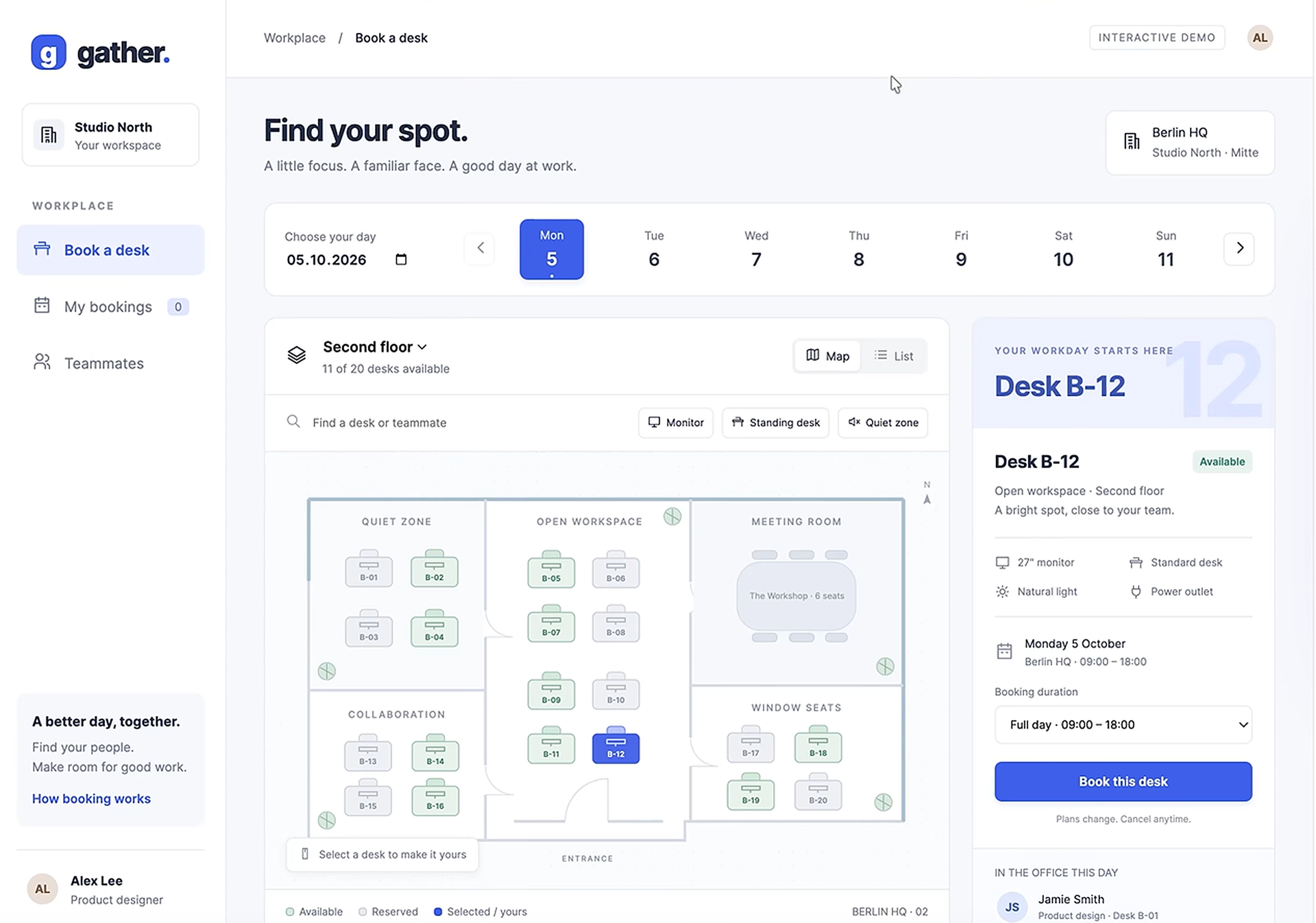
About six minutes later I had a working mockup with:
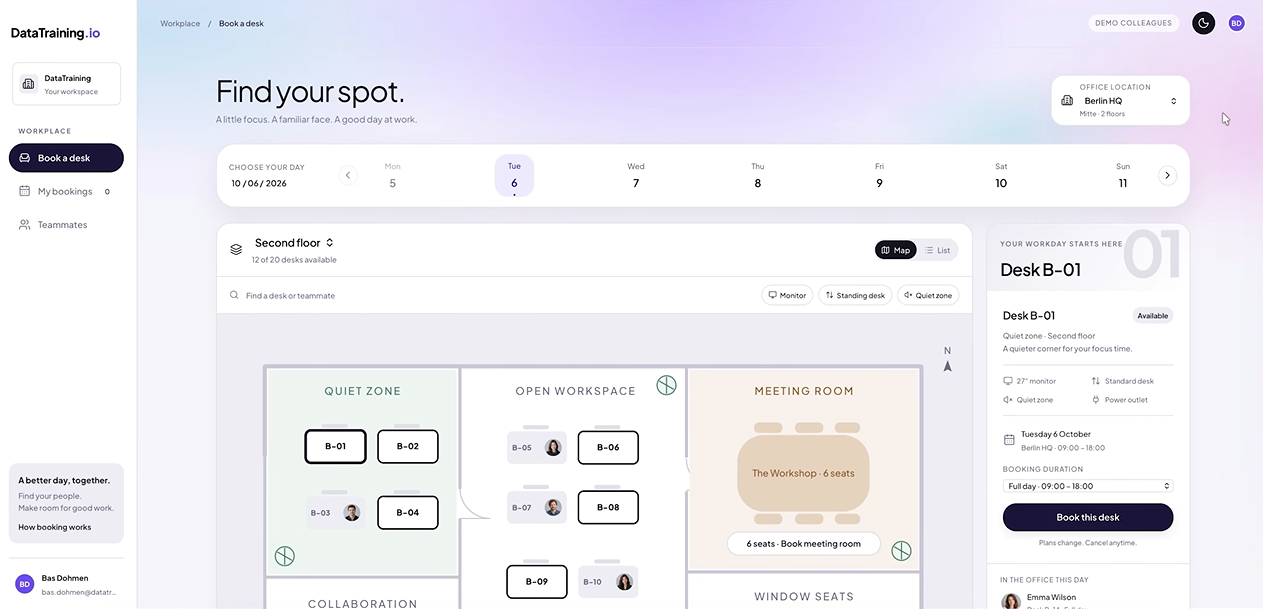
- An interactive floor plan, with free desks in green and booked desks in grey (including who booked them)
- Day and floor selection, plus filters for desk type
- A details panel for the selected desk
- Booking and cancellation, with an overview of teammates
All of this runs only in the browser. Nothing is saved to a database yet.
Making it match your brand
The first version worked, but it wasn't on brand and the teammate list had no photos. So I went back and forth for about half an hour. I gave it our design system (pointing it to the company website would also have been enough), asked for generated profile pictures for demo purposes, and fixed the meeting room booking along the way.
The final front end handles multiple locations, a map and a list view, and it blocks double bookings: both a desk that's already taken and a second booking of your own at the same time.
All of that took about 30 minutes, most of it spent generating the images, and cost about $15.
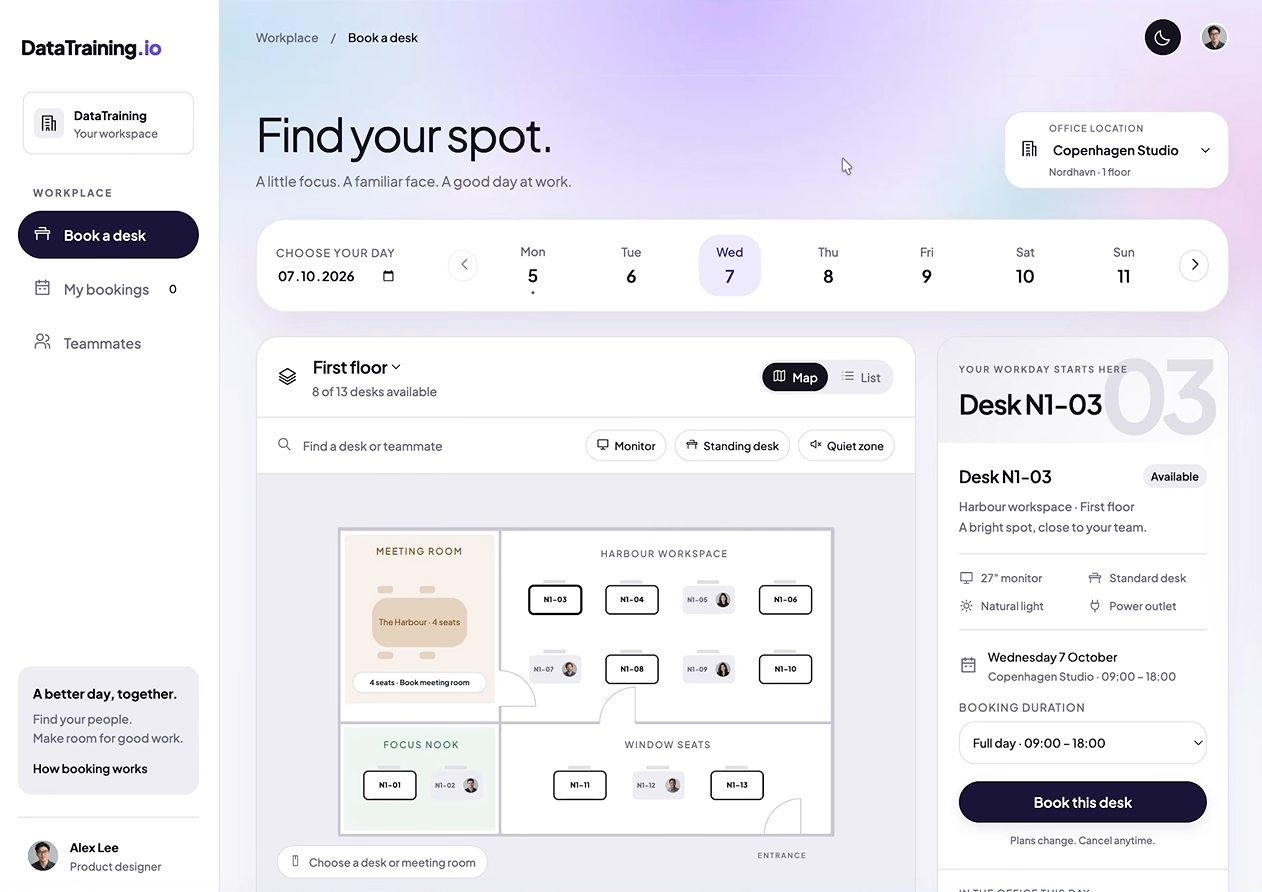
A few years ago, building an internal tool like this took months of meetings and prototypes before anyone started building the real thing. Here I had a front end close to what most SaaS products look like in half an hour, and I can change anything about it. It doesn't save anything yet, though. For that it needs a secure, scalable back end, which is what Fabric apps provide.
Step 2: Create the workspace and the Fabric app
The app lives in a Power BI workspace, so create a new workspace and assign a Fabric capacity. A trial capacity works fine. Pro and Premium support should follow soon (gamechanger!).
Inside the workspace, go to New item and search for App. Give it a name and click Create. It's deployed right away, and the left-hand menu already shows where you'll later find the database, the functions, the documentation and the usage metrics.
Fabric apps are still in preview, so expect some rough edges.
Step 3: Build the back end with a coding agent
For the back end I used Visual Studio Code, but any coding agent works. If you're new to VS Code:
- Download it from code.visualstudio.com.
- Under Extensions, install the coding agent you use (Claude Code, Codex, Copilot).
- In the Explorer, open a project folder and put your HTML mockup in it.
- When VS Code opens the folder in restricted mode, click Manage and mark it as trusted. Otherwise the agent can't read or write files.
In Claude Code I kept the default 5.5 model, since Fable 5.1 would be overkill for this. I set the mode to auto so it would keep going while I did other things.
Where the prompt comes from
You don't have to write the prompt yourself. Back in the Fabric app, the Get started page gives you the prompts. You can run them one by one, but I copied the full prompt and pasted it straight into the agent.
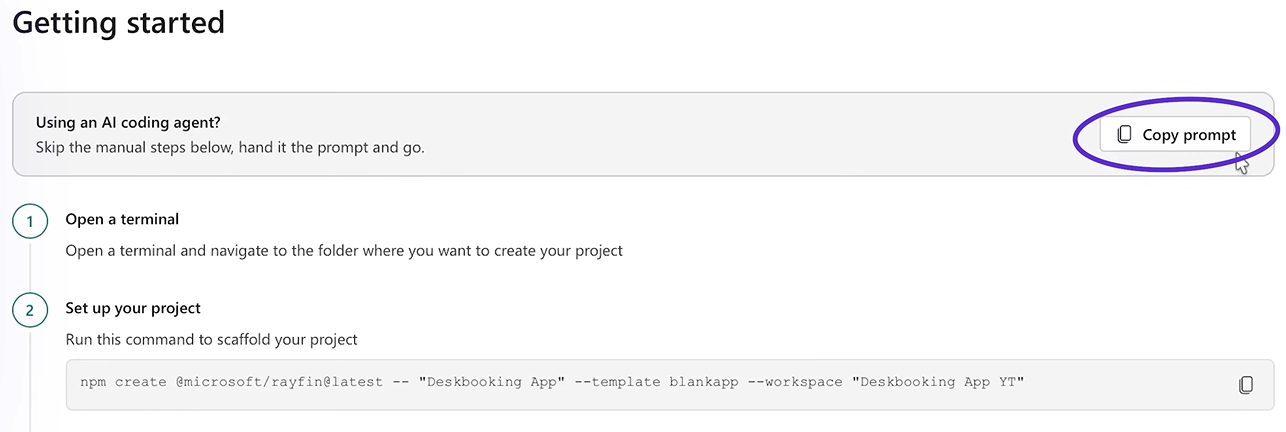
From there the agent uses the Fabric apps CLI to set up the database, authentication and the rest of the backend. It creates the folder structure and the app scaffold, and runs everything in a local environment first, before deploying to Fabric.
I only had to answer a few questions, like whether it could publish to my Fabric capacity. After about an hour the app ran locally. I reviewed it, told it to continue and deploy, and asked it to load demo data into the database.
The agent reported 2 hours and 45 minutes, but much of that was waiting time. Actual working time was about an hour, at a cost of about $8.
Step 4: Test it and check the database
Back in the workspace there are now three items: the app, a SQL database and an endpoint. The app looks exactly like the mockup, plus a light and dark mode toggle
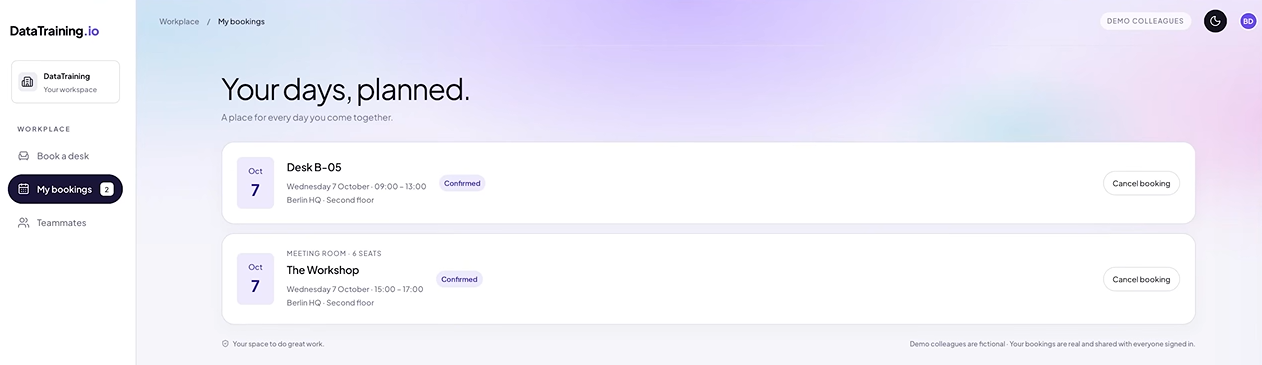
Next I checked whether bookings are saved. I booked a standing desk with a monitor for the next morning, then tried a meeting room in the afternoon. That slot was already taken, and the app told me so. I moved it to 3:00 to 5:00 and both bookings showed up under My bookings.
Finding your data
Click Manage app to see the live URL and the database. It has three tables: desk bookings, room bookings and users. That view shows the columns but not the data.
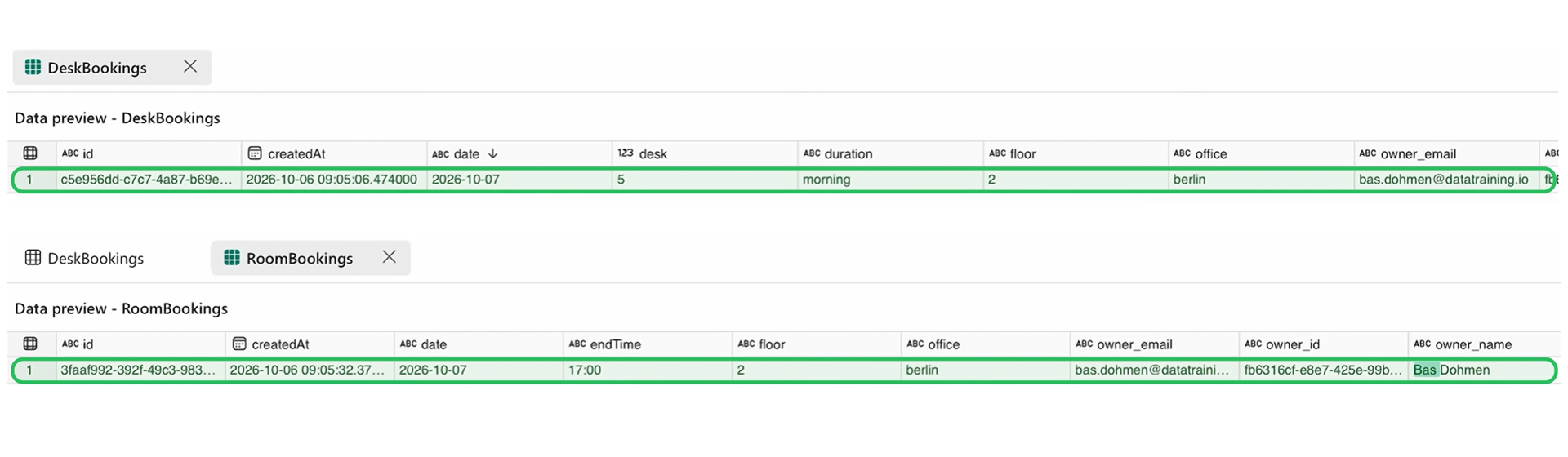
To see the rows, open the SQL database from the workspace. A warning tells you this is a shared item of the Fabric app, so careless changes can break it. There's a lot of demo data in there, so I searched for my own name. Both my desk booking and my room booking were there.
What it took, and what's still open
| Phase |
Time |
Cost |
| Front end (mockup + branding) |
~30 min |
~$15 |
| Back end (build + deploy) |
~1 hour of work (2h45 with waiting) |
~$8 |
| Total, including setup and testing |
~3 hours |
~$23 |
For about three hours and roughly twenty dollars, I had a working app inside Fabric. Fabric handles the authentication and the hosting, so it's secure and can scale across the company.
Two questions are still open, and I'll cover both in the next videos.
What does it cost to run when 100 people use the app?
And since this is vibe coding, how do you fix it when something breaks?
Fabric apps or Azure apps?
If your app doesn't need data from Fabric, Azure apps are the better fit. They're more mature and more flexible, and they support external users. Fabric apps make the most sense for internal tools built on data that's already in Fabric, where authentication, APIs and governance come built in.
Will Fabric apps replace SaaS within a year or so? It's still in preview, but it's developing quickly and getting easier to access.
Hope you like it!
Give Fabric apps a try. I'd love to hear which SaaS tool you'd replace first.